
Instructions to use gabriellarson/SimpleChat-30BA3B-V2-GGUF with libraries, inference providers, notebooks, and local apps. Follow these links to get started.
- Libraries
- llama-cpp-python
How to use gabriellarson/SimpleChat-30BA3B-V2-GGUF with llama-cpp-python:
# !pip install llama-cpp-python from llama_cpp import Llama llm = Llama.from_pretrained( repo_id="gabriellarson/SimpleChat-30BA3B-V2-GGUF", filename="SimpleChat-30BA3B-V2-F16.gguf", )
llm.create_chat_completion( messages = [ { "role": "user", "content": "What is the capital of France?" } ] ) - Notebooks
- Google Colab
- Kaggle
- Local Apps
- llama.cpp
How to use gabriellarson/SimpleChat-30BA3B-V2-GGUF with llama.cpp:
Install from brew
brew install llama.cpp # Start a local OpenAI-compatible server with a web UI: llama-server -hf gabriellarson/SimpleChat-30BA3B-V2-GGUF:Q4_K_M # Run inference directly in the terminal: llama-cli -hf gabriellarson/SimpleChat-30BA3B-V2-GGUF:Q4_K_M
Install from WinGet (Windows)
winget install llama.cpp # Start a local OpenAI-compatible server with a web UI: llama-server -hf gabriellarson/SimpleChat-30BA3B-V2-GGUF:Q4_K_M # Run inference directly in the terminal: llama-cli -hf gabriellarson/SimpleChat-30BA3B-V2-GGUF:Q4_K_M
Use pre-built binary
# Download pre-built binary from: # https://github.com/ggerganov/llama.cpp/releases # Start a local OpenAI-compatible server with a web UI: ./llama-server -hf gabriellarson/SimpleChat-30BA3B-V2-GGUF:Q4_K_M # Run inference directly in the terminal: ./llama-cli -hf gabriellarson/SimpleChat-30BA3B-V2-GGUF:Q4_K_M
Build from source code
git clone https://github.com/ggerganov/llama.cpp.git cd llama.cpp cmake -B build cmake --build build -j --target llama-server llama-cli # Start a local OpenAI-compatible server with a web UI: ./build/bin/llama-server -hf gabriellarson/SimpleChat-30BA3B-V2-GGUF:Q4_K_M # Run inference directly in the terminal: ./build/bin/llama-cli -hf gabriellarson/SimpleChat-30BA3B-V2-GGUF:Q4_K_M
Use Docker
docker model run hf.co/gabriellarson/SimpleChat-30BA3B-V2-GGUF:Q4_K_M
- LM Studio
- Jan
- vLLM
How to use gabriellarson/SimpleChat-30BA3B-V2-GGUF with vLLM:
Install from pip and serve model
# Install vLLM from pip: pip install vllm # Start the vLLM server: vllm serve "gabriellarson/SimpleChat-30BA3B-V2-GGUF" # Call the server using curl (OpenAI-compatible API): curl -X POST "http://localhost:8000/v1/chat/completions" \ -H "Content-Type: application/json" \ --data '{ "model": "gabriellarson/SimpleChat-30BA3B-V2-GGUF", "messages": [ { "role": "user", "content": "What is the capital of France?" } ] }'Use Docker
docker model run hf.co/gabriellarson/SimpleChat-30BA3B-V2-GGUF:Q4_K_M
- Ollama
How to use gabriellarson/SimpleChat-30BA3B-V2-GGUF with Ollama:
ollama run hf.co/gabriellarson/SimpleChat-30BA3B-V2-GGUF:Q4_K_M
- Unsloth Studio new
How to use gabriellarson/SimpleChat-30BA3B-V2-GGUF with Unsloth Studio:
Install Unsloth Studio (macOS, Linux, WSL)
curl -fsSL https://unsloth.ai/install.sh | sh # Run unsloth studio unsloth studio -H 0.0.0.0 -p 8888 # Then open http://localhost:8888 in your browser # Search for gabriellarson/SimpleChat-30BA3B-V2-GGUF to start chatting
Install Unsloth Studio (Windows)
irm https://unsloth.ai/install.ps1 | iex # Run unsloth studio unsloth studio -H 0.0.0.0 -p 8888 # Then open http://localhost:8888 in your browser # Search for gabriellarson/SimpleChat-30BA3B-V2-GGUF to start chatting
Using HuggingFace Spaces for Unsloth
# No setup required # Open https://huggingface.co/spaces/unsloth/studio in your browser # Search for gabriellarson/SimpleChat-30BA3B-V2-GGUF to start chatting
- Pi new
How to use gabriellarson/SimpleChat-30BA3B-V2-GGUF with Pi:
Start the llama.cpp server
# Install llama.cpp: brew install llama.cpp # Start a local OpenAI-compatible server: llama-server -hf gabriellarson/SimpleChat-30BA3B-V2-GGUF:Q4_K_M
Configure the model in Pi
# Install Pi: npm install -g @mariozechner/pi-coding-agent # Add to ~/.pi/agent/models.json: { "providers": { "llama-cpp": { "baseUrl": "http://localhost:8080/v1", "api": "openai-completions", "apiKey": "none", "models": [ { "id": "gabriellarson/SimpleChat-30BA3B-V2-GGUF:Q4_K_M" } ] } } }Run Pi
# Start Pi in your project directory: pi
- Hermes Agent new
How to use gabriellarson/SimpleChat-30BA3B-V2-GGUF with Hermes Agent:
Start the llama.cpp server
# Install llama.cpp: brew install llama.cpp # Start a local OpenAI-compatible server: llama-server -hf gabriellarson/SimpleChat-30BA3B-V2-GGUF:Q4_K_M
Configure Hermes
# Install Hermes: curl -fsSL https://hermes-agent.nousresearch.com/install.sh | bash hermes setup # Point Hermes at the local server: hermes config set model.provider custom hermes config set model.base_url http://127.0.0.1:8080/v1 hermes config set model.default gabriellarson/SimpleChat-30BA3B-V2-GGUF:Q4_K_M
Run Hermes
hermes
- Docker Model Runner
How to use gabriellarson/SimpleChat-30BA3B-V2-GGUF with Docker Model Runner:
docker model run hf.co/gabriellarson/SimpleChat-30BA3B-V2-GGUF:Q4_K_M
- Lemonade
How to use gabriellarson/SimpleChat-30BA3B-V2-GGUF with Lemonade:
Pull the model
# Download Lemonade from https://lemonade-server.ai/ lemonade pull gabriellarson/SimpleChat-30BA3B-V2-GGUF:Q4_K_M
Run and chat with the model
lemonade run user.SimpleChat-30BA3B-V2-GGUF-Q4_K_M
List all available models
lemonade list
llm.create_chat_completion(
messages = [
{
"role": "user",
"content": "What is the capital of France?"
}
]
)✨ About the SimpleChat Model Series
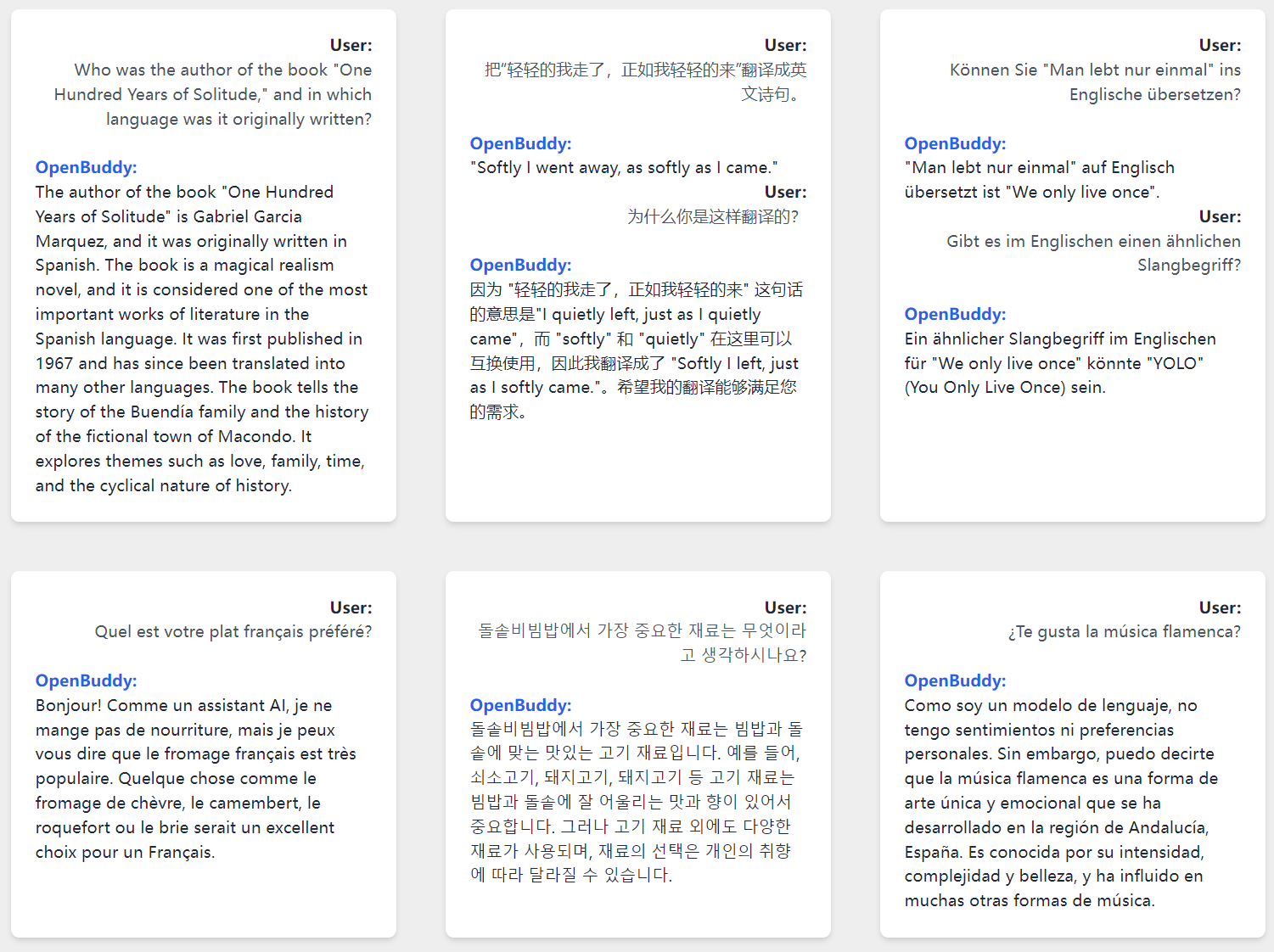
The SimpleChat series represents our new exploration into Non-Chain-of-Thought (Non-CoT) models. Its main features are:
Distinct Chat Style:
- Designed to be concise, rational, and empathetic.
- Specifically built for casual, everyday conversations.
Enhanced Creativity:
- Boosts the creativity of its generated content and its capacity for emotional understanding.
- This is achieved by distilling knowledge from advanced models, including K2.
Efficient Reasoning within a Non-CoT Framework:
- Delivers the faster response times of a Non-CoT model while preserving strong reasoning skills.
- It retains this ability because it was trained on CoT models before being transitioned to a Non-CoT framework, allowing it to think through complex problems.
Known Trade-off:
- Compared to models that specialize in Chain-of-Thought, it may not perform as strongly on mathematical tasks.
OpenBuddy - Open Multilingual Chatbot
GitHub and Usage Guide: https://github.com/OpenBuddy/OpenBuddy
Website and Demo: https://openbuddy.ai
Evaluation result of this model: Evaluation.txt
Model Info
Context Length: 40K Tokens
License: Apache 2.0
Prompt Format
This model supports a Qwen3-like prompt format, with following system prompt recommended:
You(assistant) are a helpful, respectful and honest INTP-T AI Assistant named Buddy. You are talking to a human(user).
Raw prompt template:
<|im_start|>system
{system_prompt}<|im_end|>
<|im_start|>user
{history_input}<|im_end|>
<|im_start|>assistant
{history_output}<|im_end|>
<|im_start|>user
{current_input}<|im_end|>
<|im_start|>assistant
(There should be a \n at the end of prompt.)
You may want to use vllm to deploy an OpenAI-like API service. For more information, please refer to the vllm documentation.
Disclaimer
All OpenBuddy models have inherent limitations and may potentially produce outputs that are erroneous, harmful, offensive, or otherwise undesirable. Users should not use these models in critical or high-stakes situations that may lead to personal injury, property damage, or significant losses. Examples of such scenarios include, but are not limited to, the medical field, controlling software and hardware systems that may cause harm, and making important financial or legal decisions.
OpenBuddy is provided "as-is" without any warranty of any kind, either express or implied, including, but not limited to, the implied warranties of merchantability, fitness for a particular purpose, and non-infringement. In no event shall the authors, contributors, or copyright holders be liable for any claim, damages, or other liabilities, whether in an action of contract, tort, or otherwise, arising from, out of, or in connection with the software or the use or other dealings in the software.
By using OpenBuddy, you agree to these terms and conditions, and acknowledge that you understand the potential risks associated with its use. You also agree to indemnify and hold harmless the authors, contributors, and copyright holders from any claims, damages, or liabilities arising from your use of OpenBuddy.
免责声明
所有OpenBuddy模型均存在固有的局限性,可能产生错误的、有害的、冒犯性的或其他不良的输出。用户在关键或高风险场景中应谨慎行事,不要使用这些模型,以免导致人身伤害、财产损失或重大损失。此类场景的例子包括但不限于医疗领域、可能导致伤害的软硬件系统的控制以及进行重要的财务或法律决策。
OpenBuddy按“原样”提供,不附带任何种类的明示或暗示的保证,包括但不限于适销性、特定目的的适用性和非侵权的暗示保证。在任何情况下,作者、贡献者或版权所有者均不对因软件或使用或其他软件交易而产生的任何索赔、损害赔偿或其他责任(无论是合同、侵权还是其他原因)承担责任。
使用OpenBuddy即表示您同意这些条款和条件,并承认您了解其使用可能带来的潜在风险。您还同意赔偿并使作者、贡献者和版权所有者免受因您使用OpenBuddy而产生的任何索赔、损害赔偿或责任的影响。
- Downloads last month
- 39
2-bit
3-bit
4-bit
5-bit
6-bit
8-bit
16-bit
Model tree for gabriellarson/SimpleChat-30BA3B-V2-GGUF
Base model
Qwen/Qwen3-Coder-30B-A3B-Instruct
# !pip install llama-cpp-python from llama_cpp import Llama llm = Llama.from_pretrained( repo_id="gabriellarson/SimpleChat-30BA3B-V2-GGUF", filename="", )